
Healthcare billing has become more complex than ever. As the demand for medical billing services grows, healthcare practices are also facing increasing administrative responsibilities. Outdated manual billing systems often create delays, inefficiencies, and errors that slow down the entire billing process. This is where medical billing software becomes essential. The best medical billing software can help practices automate workflows, manage claims more efficiently, and reduce administrative burdens. With the right billing software in place, healthcare providers can streamline operations, maintain HIPAA compliance, and improve their overall revenue management cycle. So, let’s talk about them in detail.
What Is Medical Billing Software?

Credit: calregional.com
Before choosing a system, it helps to understand medical billing software and why it is essential.
Medical billing software is a digital tool that helps healthcare providers manage their financial workflows. It connects clinical documentation with billing operations and ensures claims are submitted correctly.
Instead of managing everything manually, practices use billing software to automate many tasks, such as:
- Collecting patient information
- Verifying insurance eligibility
- Generating claims
- Submitting claim submissions electronically
- Tracking payments and claim denials
- Producing financial reports through reporting and analytics
Modern medical billing and coding practice software also integrates with electronic health records and practice management systems. This connection helps reduce duplicate work and improve billing accuracy.
By automating bill generation and claim management, practices can reduce errors and speed up reimbursements.
In short, the right software transforms a complicated billing process into a structured and efficient workflow.
Why Medical Billing Software Is Essential for Practices
Healthcare billing has become increasingly complicated over the past decade.
Insurance companies frequently update their reimbursement rules. Coding guidelines evolve. Compliance regulations also continue to expand.
Managing all of this manually increases the risk of errors.
Even small mistakes during claim submissions can lead to claim denials or payment delays.
A strong medical billing software solution helps practices manage these challenges by automating tasks and improving claim management.
Practices that use modern billing solutions often experience several improvements:
- Faster claim submissions
- Reduced errors in coding and documentation
- Better visibility into financial performance
- Improved revenue cycles
Billing software also provides reporting and analytics dashboards. These reports allow practice managers to track collections, monitor claim denials, and evaluate financial performance across providers.
When billing systems work efficiently, staff spend less time fixing problems and more time supporting patient care.
Understanding Your Practice Needs Before Choosing Software

Credit: agilityportal.io
Before selecting one of the top medical billing software platforms, it is important to evaluate your practice’s needs. Every healthcare organization operates differently. The software that works for one clinic may not work for another.
Start by considering your practice size.
For example, a small clinic may look for the best medical billing software for small business practices. These systems typically focus on simplicity and affordability.
Large healthcare organizations often require more advanced systems with strong reporting and analytics capabilities.
You should also consider your specialty and claim volume. Practices that handle large numbers of claims benefit from strong automation tools that simplify the claims process.
Other important questions include:
- Do you need integration with practice management software?
- How important are reporting tools for financial performance?
- What level of automation do you need for claim submissions?
Understanding these needs will help you identify the most suitable medical billing software features for your organization.
Now, let’s discuss the top medical billing software.
Kareo
Credit: youtube.com
A Simple Platform Designed for Independent Practices
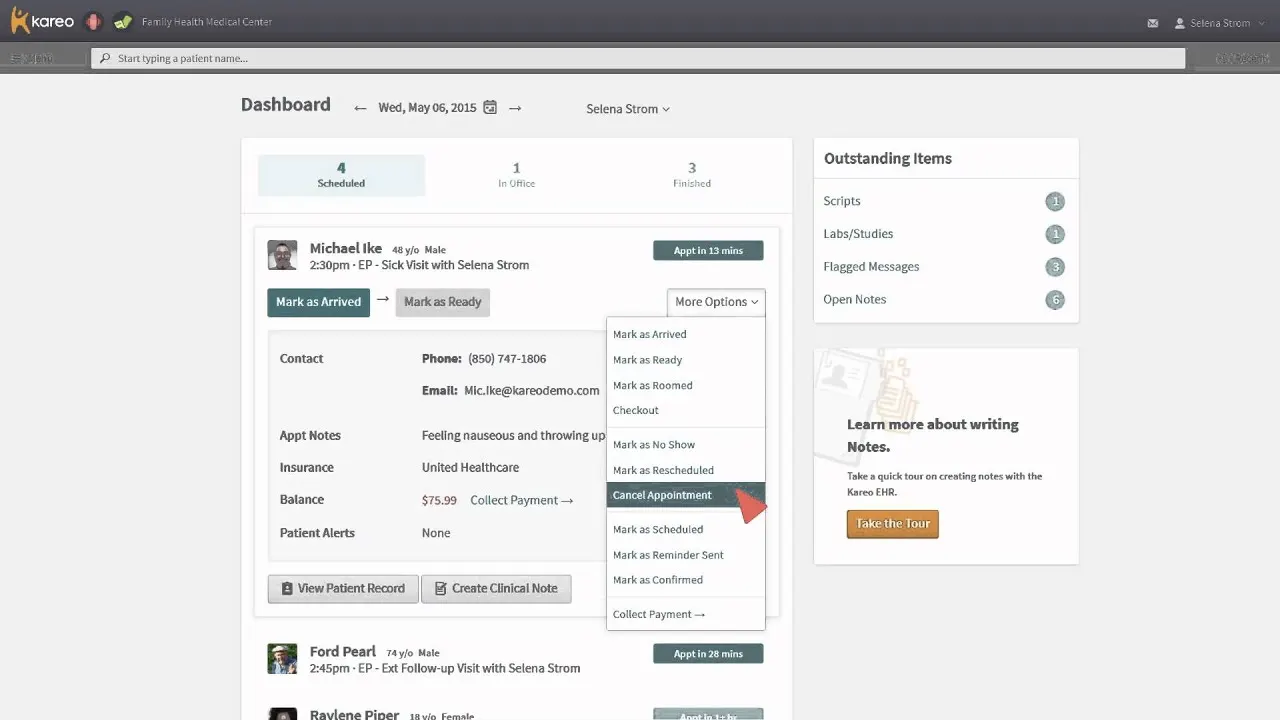
For many independent providers, Kareo is one of the most common medical billing software platforms available today.
Kareo focuses on simplicity and accessibility. It is particularly popular among smaller practices that want a reliable billing system without unnecessary complexity.
Because it is cloud-based, staff can access the system from anywhere and manage the entire billing process in one place.
Key Features
Kareo includes several essential medical billing software features:
- Electronic claim submissions
- Insurance verification tools
- Payment tracking dashboards
- Patient billing management
- Reporting and analytics
Pros
- User-friendly interface
- Suitable for smaller practices
- Strong integration with practice management tools
Cons
- Fewer advanced analytics features
- May not scale well for very large organizations
How It Works
Kareo connects patient information with billing workflows. After a patient visit is documented, the system automatically generates claims and submits them electronically to insurance companies. However, even with automated systems, practices may still face issues like claim rejections or delays. Understanding the common reasons behind these problems can help practices reduce billing errors and improve reimbursements. You can learn more about this in our guide on claim denials in medical billing.
AdvancedMD

Credit: advancedmd.com
A Platform Built for Revenue Cycle Visibility
AdvancedMD is often considered among the top medical billing software platforms for growing practices.
The platform focuses heavily on automation and analytics. Many healthcare organizations use AdvancedMD to gain deeper insights into their revenue cycles.
Key Features
- Automated claim management
- Denial tracking tools
- Revenue cycle analytics
- Integrated practice management system
Pros
- Strong reporting and analytics tools
- Scalable platform for expanding practices
- Automation helps reduce errors
Cons
- Learning curve for new users
- Higher billing software cost compared to basic systems
How It Works
AdvancedMD connects clinical documentation with claim management tools. Claims are generated automatically and validated before submission, helping reduce claim denials.
DrChrono

Credit: drchrono.com
A Modern Platform with Strong Mobile Capabilities
It is another widely recognized medical billing software solution that combines EHR, billing, and scheduling into one system.
Many providers appreciate its mobile functionality, which allows clinicians to manage billing tasks directly from mobile devices.
Key Features
- Integrated medical billing and coding practice software
- Mobile applications for providers
- Automated claim submissions
- Customizable billing workflows
Pros
- Modern and intuitive interface
- Flexible customization options
- Strong integration capabilities
Cons
- Pricing increases with added features
- May require training for new users
How It Works
DrChrono links clinical documentation with billing workflows. When a visit is recorded, the system automatically generates claims and submits them to insurance companies.
CureMD
Credit: curemd.com
An All-in-One Billing and Practice Management System
CureMD is designed to provide an integrated solution for medical billing, coding, and practice management.
Many organizations use CureMD because it helps automate revenue cycles while connecting clinical and financial workflows.
Key Features
- Automated billing process
- Denial management tools
- Integrated practice management platform
- Reporting and analytics dashboards
Pros
- Strong automation tools
- Integrated clinical and billing workflows
- Helpful for mid-sized practices
Cons
- Implementation may require additional training
- Customization can take time
How It Works
CureMD converts patient encounters into billable claims and manages the entire claims process through automated workflows.
PracticeSuite
Credit: practicesuite.com
A Flexible Platform for Multi-Specialty Practices
PracticeSuite is often recommended for practices that require flexibility and scalability.
The platform supports multiple specialties and offers powerful reporting tools that help track financial performance.
Key Features
- Automated claim submissions
- Multi-specialty billing solutions
- Detailed reporting and analytics
- Integration with multiple systems
Pros
- Customizable workflows
- Strong reporting tools
- Scalable platform
Cons
- The setup process may require time
- The interface may feel complex initially
How It Works
PracticeSuite manages the entire billing process, from claim creation to payment posting, while providing insights into revenue cycles.
AthenaCollector
Credit: athenahealth.com
A Revenue Cycle Platform Designed for Larger Practices
AthenaCollector is a sophisticated billing system that focuses on improving financial performance.
Large healthcare organizations often choose AthenaCollector because it continuously analyzes claim submissions and identifies potential issues.
Key Features
- Automated claim management
- Payer rule updates
- Advanced reporting and analytics
- Denial tracking tools
Pros
- Strong automation capabilities
- Advanced financial insights
- Large payor network support
Cons
- Higher medical billing software cost
- May be too complex for small practices
How It Works
All in all, this software monitors claim submissions and identifies errors before they reach insurance companies. This helps reduce claim denials and improve collections.
Important Features to Look For
When evaluating software, focus on the medical billing software features that improve efficiency.
Essential features include:
- Automated claim submissions
- Claim management tools
- Payment posting automation
- Reporting and analytics dashboards
- Practice management integration
- HIPAA-compliant security
Some providers also look for free medical billing software options when starting out. While free tools exist, they often lack advanced automation and reporting capabilities.
Understanding Medical Billing Software Cost
Another important factor is the medical billing software cost.
Pricing varies widely depending on the platform and features offered.
Typical pricing models include:
- Monthly subscriptions per provider
- Percentage-based billing services
- Transaction-based pricing for claim submissions
The billing software cost for most practices ranges from around $50 to $600 per provider each month.
Evaluating cost alongside features ensures you select a system that fits both your workflow and budget.
Final Thoughts
We have established the foundation that choosing the best medical billing software is one of the most important technology decisions a healthcare practice can make. The right system improves claim management, reduces errors, and strengthens financial performance. The wrong platform can slow down workflows and increase administrative work.
Take the time to evaluate your needs, compare platforms carefully, and test systems before making a final decision.
Frequently Asked Questions
To help you further, here are answers to some frequently asked questions about medical billing software.
What is medical billing software?
It is a digital billing system that helps healthcare providers manage the billing process, submit claims to insurance companies, track payments, and monitor revenue cycles.
What is the best medical billing software for small business practices?
The best medical billing software for small business practices usually includes tools like Kareo, DrChrono, and PracticeSuite because they combine billing solutions with practice management and automation features.
What software is used for medical billing and coding?
Common software includes Kareo, AdvancedMD, CureMD, AthenaCollector, and PracticeSuite.
How much does medical billing software cost?
The billing software cost typically ranges from $50 to $600 per provider per month, depending on features and claim volume.
Is there free medical billing software available?
Yes, some providers offer free medical billing software or trial versions, but paid platforms usually provide better automation, reporting, and claim management tools.